Prototyping Automatic PR Reviews in Azure DevOps

Recently our project team at work started using the /code-review skill of Claude Code to review each other's PRs. This is a very manual process: whenever a new PR comes through, we each run a local instance of Claude Code to review it. I quickly thought of a process improvement that I've seen elsewhere online: an automatic PR review that spins up as soon as a new PR is published and adds comments.
There was just one hitch with my plan. The repository was hosted in Azure DevOps as a private project on the free tier of the platform. The happy path would be a Microsoft-hosted job, or a job that runs in the cloud, but triggering automatic PR reviews through a cloud job would run the risk of us exhausting our monthly CI/CD minutes (1,800 per month), and we need those minutes for pre-production build checks such as unit test suite runs.
Thankfully, Azure provides self-hosted jobs as an alternative. Even on the free tier of Azure DevOps, you still get one self-hosted parallel job with no monthly minute limit. That means only one job can run on self-hosted agents at the same time across your organization. If you’re not using that parallel job slot for anything yet, it’s perfect for running automated Claude PR reviews without eating up any of your monthly minutes.
An idea was forming in my head. It was time for a good old-fashioned proof of concept. 🧪
A self-hosted review agent
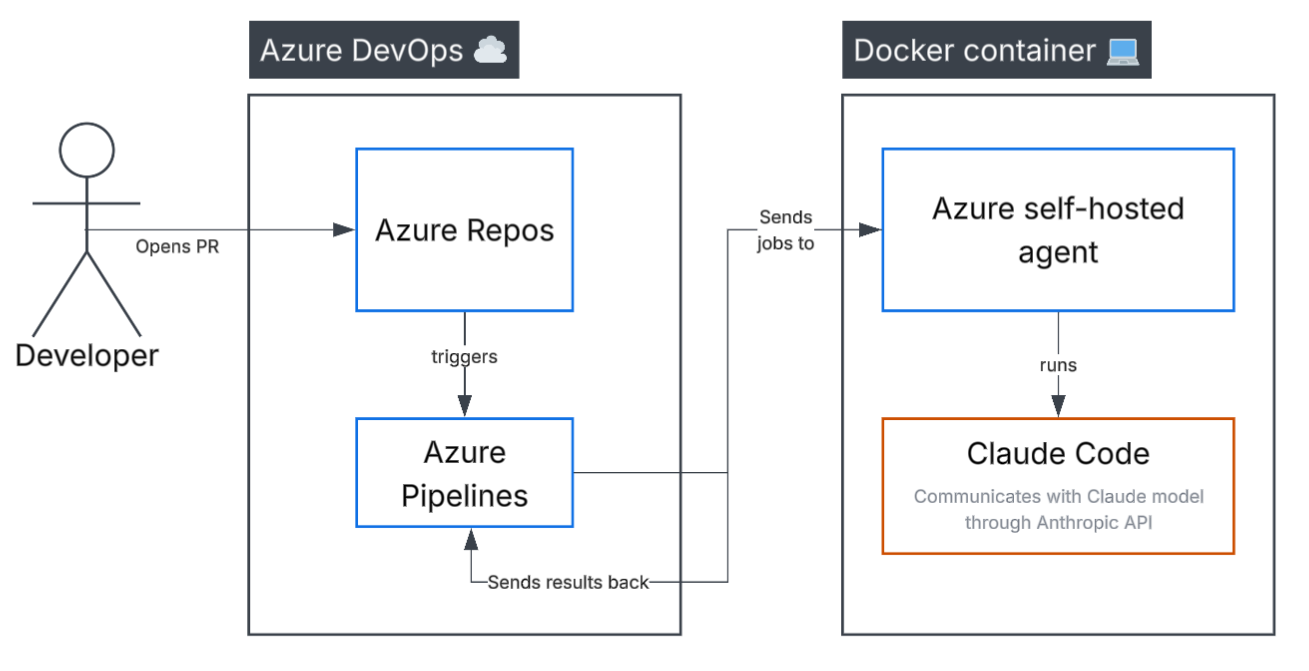
At a really high level, what I ended up implementing looked something like the above diagram. I set up a Docker container on my workstation that sets up and runs the agent, which in turn, runs Claude Code. Claude Code hands instructions to the Claude model, which returns results. The agent hands back those results to Azure and uses the Azure DevOps REST API to write PR comments, completing the review.
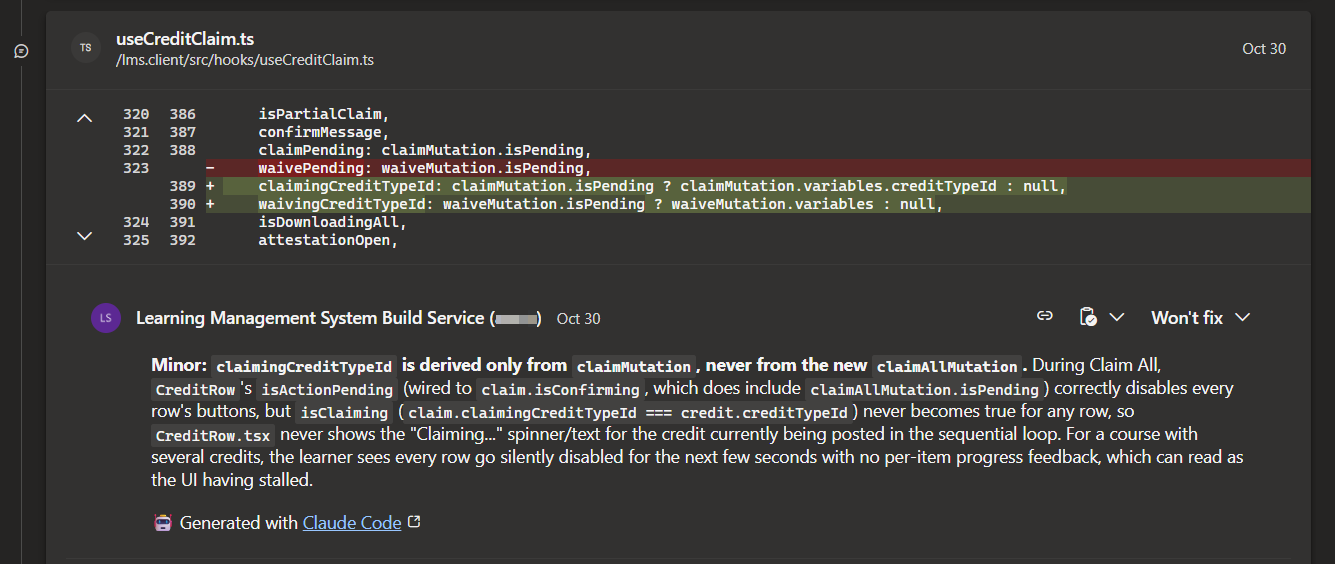
The end result: as new PRs come in, and as developers update their PRs, an optional check in the PR pipeline runs and PR comments are left by the Build Service user of the repository. Of course, this flow has serious limitations, which were acceptable since it was a proof of concept:
- The process requires my PC to be online and have access to internet, so the self-hosted agent can do its work in the Docker container. Eventually, this sort of agent would be better hosted on an always-on server or VM.
- All new PRs use my individual Claude Pro subscription to do the review. If I worked in a very large team, this would result in me running out of usage rather quickly from automated PR reviews alone. (We'll dive into this later in the post.)
So, how did I do it? It's much more involved than this section alone shows, which is why the post doesn't end here. Let's get into the gory details. 🤓
First, create the Docker container
I started by installing Docker for Windows and creating a new container. Why use a Docker container instead of running the agent on my computer directly? Since an instance of Claude Code will be handling the PR reviews, running that instance in a container ensures that Claude can't access any sensitive information on my PC that it doesn't need. The Docker container puts Claude Code in a siloed environment with access to only the data and tools it needs to complete the review.
I used the following Dockerfile for this, generated by AI. It’s pretty similar to the one provided in Microsoft’s docs, with some minor differences. I went with Linux containers even though I'm on Windows, since they're the default, are more performant, and this workflow improvement will scale better with Linux containers if it graduates from my PC to a real server somewhere.
FROM ubuntu:22.04
ENV DEBIAN_FRONTEND=noninteractive
ENV TARGETARCH="linux-x64"

RUN apt-get update && apt-get install -y curl git jq libicu70 ca-certificates \
 && curl -fsSL https://deb.nodesource.com/setup_20.x | bash - \
 && apt-get install -y nodejs \
 && npm install -g @anthropic-ai/claude-code \
 && rm -rf /var/lib/apt/lists/*

RUN useradd -m agent
WORKDIR /azp
# start.sh comes from Microsoft's "Run a self-hosted agent in Docker" docs page
COPY start.sh .
RUN sed -i 's/\r$//' start.sh && chmod +x start.sh && chown -R agent:agent /azp
USER agent
ENTRYPOINT ["./start.sh"]
You can get the start.sh script directly from Microsoft’s docs - mine is no different from theirs: https://learn.microsoft.com/en-us/azure/devops/pipelines/agents/docker?view=azure-devops#linux.
Set up a new agent pool
In order to create a self-hosted agent, you need a pool to run it in. Thankfully, Azure lets us do this for free. Do the following:
- Create a new personal access token (PAT) in Azure DevOps, selecting
Custom definedfor Scopes, clicking “Show all scopes”, and selecting Agent Pools → Read & manage. Click Create and save the token value somewhere. This will be used as theAZP_TOKENvalue in the following steps. - Then, go to Azure DevOps → Project settings → Agent pools. Click Add pool and keep New selected under “Pool to link”. For Pool type”, select Self-hosted, enter the name of the pool (which will be used as the
AZP_POOLvalue later), and check the “Grant access permission to all pipelines” box. Click Create.
Build and run the Docker container
From the directory where your Dockerfile and start.sh files reside, run the following to build the Docker container image:
docker build -t claude-review-agent .
Here, claude-review-agent is the name of the image.
Next, run the following command in PowerShell to create and start a new Docker container (AZP_AGENT_NAME can be whatever you like, but the claude-review-agent part needs to match the image name you used in the previous step):
docker run -d --name claude-review-agent --restart unless-stopped `
  -e AZP_URL=https://dev.azure.com/YourOrg `
  -e AZP_TOKEN=<PAT from step 1 above> `
  -e AZP_POOL=<name of pool created in step 2 above> `
  -e AZP_AGENT_NAME=docker-self-hosted-review-agent `
  claude-review-agent
Now check the container logs. If it is running correctly, you should see logs like this:
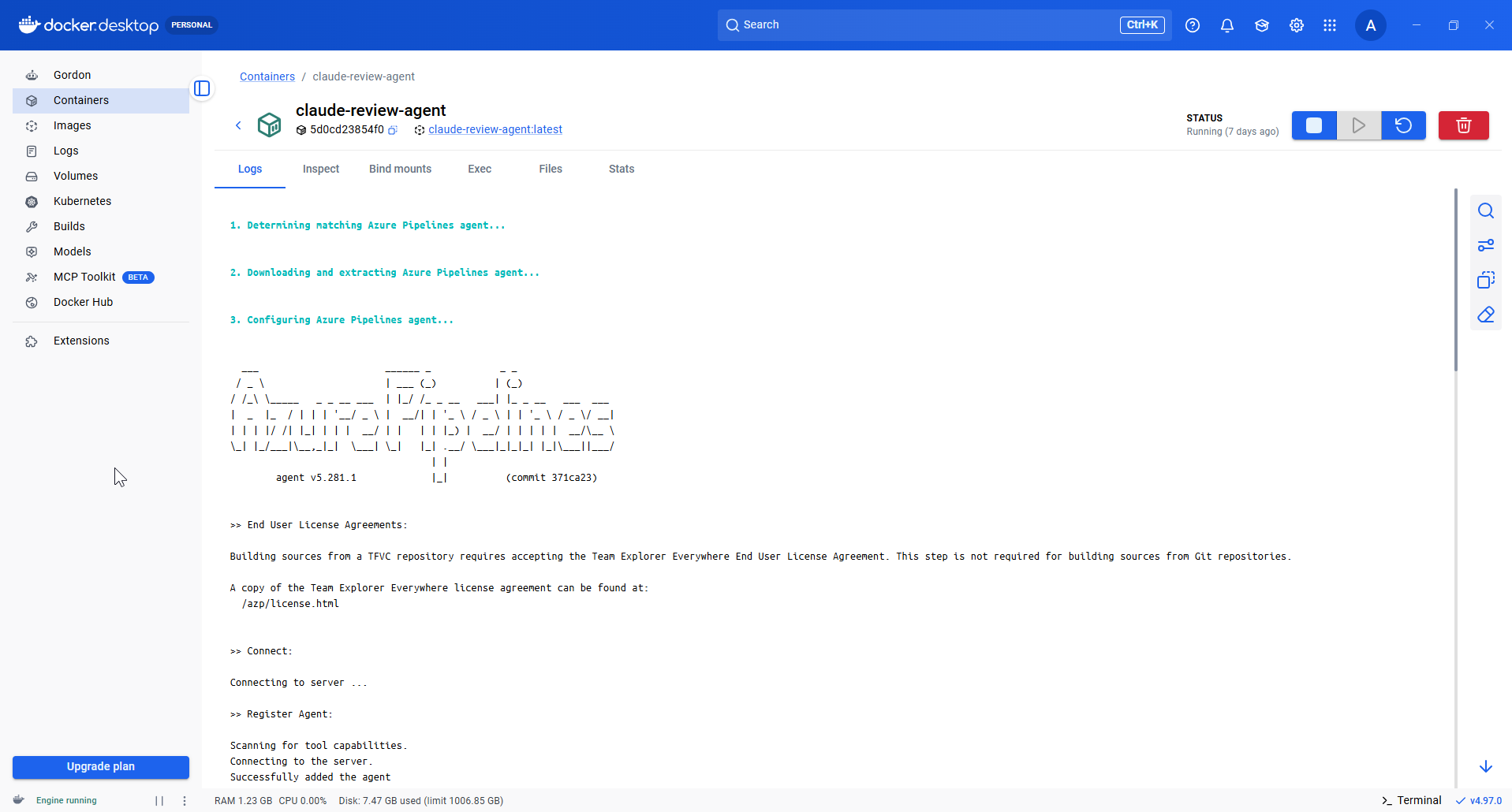
Hooray! 🎉On to the next part.
Obtaining an Anthropic token
Before continuing, you will need a token that will allow Claude Code (the harness) to call Claude (the AI model) from the pipeline. This can be generated in one of the following ways:
- Generating an
ANTHROPIC_API_KEYfrom the Claude Console at platform.claude.com using your organization’s Anthropic account, or - Generating a one-year-valid OAuth token (
CLAUDE_CODE_OAUTH_TOKEN) using theclaude setup-tokencommand from the CLI while logged in.
Option 1 involves token-based billing against the organization, and my team lead advised it would be too costly for our company, so I went with the OAuth token because usage gets incurred against my personal Claude Pro subscription, not the organization. That also means that automatic PR review runs eat up my own personal usage, but while testing this POC for a few days, that never became a problem for me.
Creating the Azure pipeline
The next step is to create the Azure DevOps pipeline in the repository (e.g. /pipelines/claude-review.yml), referencing the token you just obtained as an environment variable:
# Claude PR review pipeline.
# Triggered by the Build Validation branch policy on `development` (not by YAML triggers).
trigger: none
pr: none

pool:
  name: claude-review   # the self-hosted pool the Docker agent registered into

steps:
- checkout: self
  fetchDepth: 0         # full history so we can diff against the target branch
  clean: true

# Checkout does not persist its credentials, so the fetch authenticates itself. It runs in its own step to keep the
# token out of the Claude step's environment.
- bash: |
    git -c http.extraheader="AUTHORIZATION: bearer $SYSTEM_ACCESSTOKEN" \
      fetch --no-tags origin "${SYSTEM_PULLREQUEST_TARGETBRANCH#refs/heads/}"
  displayName: Fetch the target branch
  env:
    SYSTEM_ACCESSTOKEN: $(System.AccessToken)

- bash: node pipelines/post-review.js --export-open-threads "$AGENT_TEMPDIRECTORY/open-threads.json"
  displayName: Export open review threads
  env:
    SYSTEM_ACCESSTOKEN: $(System.AccessToken)

- bash: |
    set -euo pipefail
    TARGET="${SYSTEM_PULLREQUEST_TARGETBRANCH#refs/heads/}"
    OUT="$AGENT_TEMPDIRECTORY/review.json"
    THREADS="$AGENT_TEMPDIRECTORY/open-threads.json"

    if ! claude -p "/code-review Review the changes in 'git diff origin/$TARGET...HEAD'. Your Bash tool runs only a plain git diff, git log or git show command: redirects, pipes, && and any other command are refused, so never try to save output to a file. For a large change, start with 'git diff --stat origin/$TARGET...HEAD', then diff a few related files per call with 'git diff origin/$TARGET...HEAD -- <path> <path> ...', since each call spends a turn, and use Read, Grep and Glob for everything else. origin/$TARGET is already fetched and current, so never fetch or pull. This run is non-interactive: nobody can approve a command or answer a question, so if a command is refused, carry on with what you have and still end with the JSON answer. The file at $THREADS lists the review threads you left on this PR in earlier runs that are still open, each with its id, severity, file, line, comment and any replies. Check each one against the current code: if its problem is fixed, add its id to resolvedThreadIds; if it is not, add an entry for it to stillOpen and do not raise it again as a finding. A stillOpen reason is one or two sentences, written to the developer, saying what in the current code still causes the problem; if someone replied on the thread, answer what they said. Rank every finding's severity as major or minor. A major finding is one a reviewer would block the merge over: wrong behavior, lost or corrupted data, a security hole, or a crash or failure, in realistic use. Anything that needs an unlikely chain of events to go wrong is minor, as are hardening, performance and style. When unsure, choose minor. Report a minor finding only when a reviewer would plausibly act on it. After the review, output ONLY a JSON object with three keys: findings, an array of objects with the keys file, line, severity and comment (file is the repo-relative path starting with /, line is the line number in the new version of the file, severity is \"major\" or \"minor\", comment is your review comment in Markdown); resolvedThreadIds, an array of the ids of the fixed threads; and stillOpen, an array of objects with the keys id and reason for the listed threads that are not fixed. Output {\"findings\": [], \"resolvedThreadIds\": [], \"stillOpen\": []} if there is nothing to report." \
      --add-dir "$AGENT_TEMPDIRECTORY" \
      --allowedTools "Read,Grep,Glob,Bash(git diff:*),Bash(git log:*),Bash(git show:*)" \
      --disallowedTools "Read(//proc/**)" \
      --output-format json \
      --max-turns 60 \
      > "$OUT" < /dev/null; then
      # The next step reports a turn-limit stop on the PR and fails the check there. The output's permission_denials
      # show whether the turns went to refused commands or the limit is simply too low.
      if grep -Eq '"subtype": *"error_max_turns"' "$OUT"; then
        echo "##vso[task.logissue type=warning]Claude reached its turn limit before finishing the review. Output:"
        cat "$OUT"
        exit 0
      fi

      echo "##[error]Claude exited with an error. Output:"
      cat "$OUT"
      exit 1
    fi
  displayName: Run Claude review
  timeoutInMinutes: 40  # well past what 60 turns take, so the turn limit, which the next step reports, stops it first
  env:
    CLAUDE_CODE_OAUTH_TOKEN: $(CLAUDE_CODE_OAUTH_TOKEN)

- bash: node pipelines/post-review.js "$AGENT_TEMPDIRECTORY/review.json"
  displayName: Post review comments to PR
  env:
    SYSTEM_ACCESSTOKEN: $(System.AccessToken)
This pipeline runs a custom JavaScript file (/pipelines/post-review.js) with logic dictating how to complete the review. It's a highly opinionated script written by AI, and it's specifically geared towards Azure DevOps pull requests. Here are some of the cool things it does:
- It prefixes all review comments with "Minor:" or "Major:", indicating whether the agent thinks the finding is simply a nitpick or should block the PR from being approved & merged.
- Since it uses my Azure DevOps account to post comments, it places a
🤖 Generated with Claude Codesignature at then end of each comment to make it clear which comments are actually made by me. - It marks open PR threads as Resolved when it validates that fixes were made, or Closed for comment threads it added that were informational only.
- It doesn't actually approve or reject the PR - it posts comments only. However, it does post a comment indicating it approves the PR if no new findings are found and any existing ones were resolved.
The script is quite large, so I'll link it here via a Gist. To be honest, you don't really need to use my version, you can just have Claude Code come up with your own. Here's the Gist though - pardon the irony of this living in GitHub, of course: https://gist.github.com/aldrichdev/20efe6d5fd22f35f70856d12985f3185
Commit, push and merge the pipeline and script file. Then in Azure DevOps, navigate to Pipelines → New pipeline → Azure Repos Git → Select your repository → Select Existing Azure Pipelines YAML file → Select the pipeline file. Click Continue.
Edit the pipeline in Azure DevOps and click Variables. Create a new variable named CLAUDE_CODE_OAUTH_TOKEN (if you went with an OAuth token) or ANTHROPIC_API_KEY if you went with the organization-level token, and paste the value of the token, making sure not to include any line breaks.
Set up permissions and branch policy
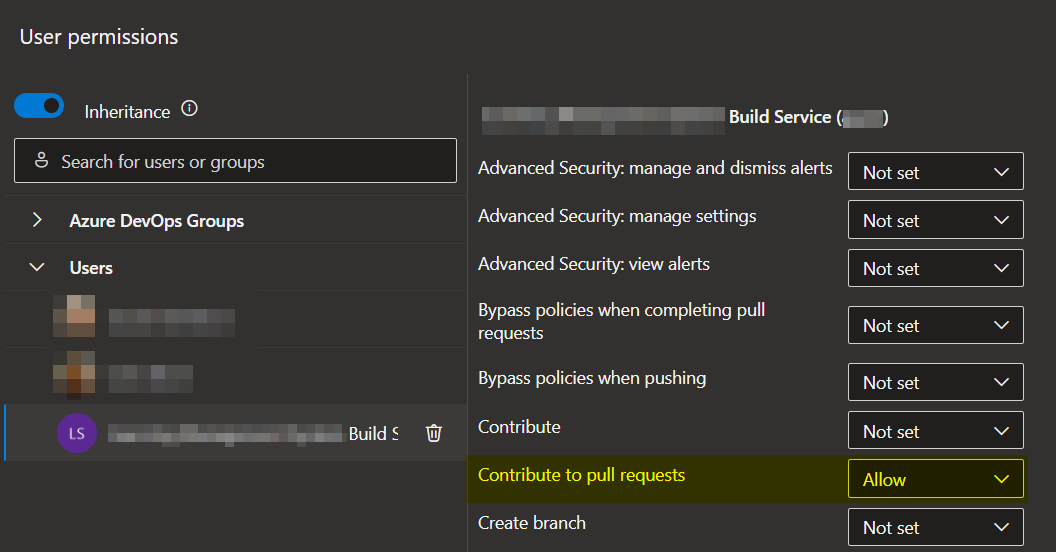
Next we need to let the new pipeline comment its review findings on the PRs directly. To do this, navigate to Project settings → Repositories → Select your repo → Security. In the list, find the Build Service user for your project - it should look something like <Your Project Name> Build Service (<your org>) - searching for it may not work, so it’s recommended to just scroll down until you see it. Select that user and change the Contribute to pull requests permission to Allow. Changes will save automatically.
Finally, add a branch policy to the branch that you want the automatic PR reviews to run towards; e.g. if you want automatic PR reviews to run for PRs into develop, then add the branch policy to that branch. To do this, in Azure DevOps navigate to Repos → Branches, find your branch, click the … next to it → Branch policies. On the Policies tab, scroll down to Build Validation and click the + button, then fill out the form like this:
Build pipeline→ Select the pipeline you already created in Azure DevOps.Path filter (optional)→ empty.Trigger→Automatic (whenever the source branch is updated).Policy requirement→Optional(recommended, so a broken PR review does not block merges).Build expiration→After 12 hours if <branch> has been updatedDisplay name→ Whatever you want. I called mineClaude review.
The branch policy is the final piece of the puzzle: when a PR is opened or updated, it kicks off the pipeline which runs the custom script. To handle this job, the agent pool selects the self-hosted agent, which in turn executes Claude Code and handles the review. As a result, the developer gets their code reviewed by AI automatically.
Conclusion
This was a fun, successful experiment for our project team, and I'm glad I took the initiative to do it. Be advised though: the solution presented in this post doesn't automate everything! Sure, the code is reviewed, and the comments are placed appropriately, but it doesn't do the developer's job for them. They still need to make fixes to the code, push up those fixes, check for any new findings & iterate.
Additionally, these are AI-powered reviews, which doesn't represent the whole code review picture. Realistically, you will have agents and humans reviewing your work. I am in no way suggesting that agent reviews are a good-enough replacement for human-led code reviews. There are some things only the human eye can find, and likewise for AI, which is why it's useful they team up.
I hope you enjoyed this post and learned something from it. Agentic AI has definitely changed the code review landscape for us as developers, I think in a good way!
About the author
- I am a full-stack developer specializing in React, Next.js, TypeScript, C#, .NET and Sitecore. I love working on back-end as well as front-end, writing documentation, finding solutions to problems, and writing technical blog posts to help others. I've been Sitecore certified and Coveo for Sitecore certified twice.