What I Learned From .NET Conf 2026
.NET Conf was last week, and I finally finished watching all the content from Days 1 & 2. This year's event took me a bit longer to get through, but better late than never, am I right? In this article, I am going to dive into what I learned and what I found interesting or cool by virtually attending this year's .NET Conf!
Keynote
The keynote began with some flexing by Scott Hanselman. Appropriate. I didn't know that he's been working with .NET since the 1980s, that's massively impressive. He also showed that he has GitHub activity dating to the 1970s which is a bit hacky really cool. The TinyOS demo was crazy, it was some sort of application that showed a CRT screen with terminal data, along with an old school yellow notepad app interface, all upgraded to .NET 11. Hard to describe, but very vintage, and I recommend you watch it for yourself.
The big news in the keynote was of course, that .NET 11 is out and can be downloaded now. I've already started using it for a brand new Blazor Server app I've built. C# version 15 is also available, as well as EF Core 11, and Visual Studio 18.12.0.
What's New In C# 15
The big new feature in C# 15 is union types. I’ve been in a situation more times than I can count where I’ve wanted to define multiple variations of one thing in C#. Usually I reached for an interface or a base class that each of those variations would inherit from. However, in C# 15 there seems to be a better way! You can define a union like this: union Vehicle(Compact, Truck, Van). It’s especially useful if you use a switch statement to return a different result for each variation since you don’t need a discard (_ => …). I can’t wait to utilize union types in future projects!
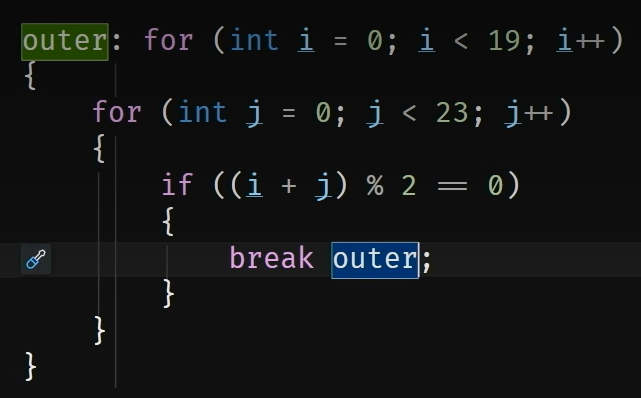
Another really cool feature that I saw which is new in this version is labeled loops. You can break out of a specific loop by naming the loop, like this: break outer;. That was so cool to see live.
The new closed keyword seems cool too - somewhat similar to sealed (which means you can’t inherit from the class at all), but you can only inherit from a closed class if the class you are trying to inherit it from is a subclass within the same assembly.
Dropping "Core"
This isn't anything new, but by watching this year's conference I finally realized they completely dropped the word "Core" (as in .NET Core) from their latest releases. I think this makes a lot of sense. Initially I was skeptical because when .NET Core came out, if you had experience with it or knew how to work with it, it was a big deal to put that on your resume. At the time, saying you had experience in .NET was ambiguous, because was it just .NET Framework, or the latest cross-platform version of .NET as well? Now, it's implied that .NET is cross-platform because it has been for so many years, so I like that they dropped the word Core.
Native AOT was a big deal this year
I hadn’t heard anything about native AOT until this conference, but apparently it’s been an optional configuration of .NET since 7.0. AOT stands for Ahead-Of-Time, and it’s an alternative compilation method to the JIT (Just-In-Time) compilation method that we are familiar with as .NET developers. With AOT, code is compiled on the developer’s machine at publish time, not at runtime. This results in faster startup time of the application, lower memory usage, and doesn't require the .NET runtime to be installed for your app to run.
Native AOT isn't enabled by default even in .NET 11. However, it can be turned on in the project file like so:
<PropertyGroup>
    <PublishAot>true</PublishAot>
</PropertyGroup>
Microsoft is apparently working on making various projects AOT-friendly, including the CLI. Nice!
BuildX and Multithreading!
dotnet build currently uses MSBuild by default, which is the classic .NET build engine where one project builds and then other projects up the tree need to build too. That works just fine, but the developers at Microsoft are working on a new incremental build called BuildX, which has resulted in 94% less build time. BuildX isn't available yet, but the team at Microsoft is working on providing it as an alternative that we can use, and potentially one day it may replace MSBuild and be used whenever you run dotnet build.
Additionally, in .NET 11 there's a new dotnet build flag we can use: -mt, like this: dotnet build -mt. This runs MSBuild in a multi-threaded capacity, resulting in lower build times. This will be enabled by default in .NET 11.0.200 and beyond.
File-based apps look nifty
Don't ask me how, but I completely missed this feature at last year's .NET Conf. Starting with .NET 10, you can have a single C# file constitute an app and run it via dotnet run myApp.cs. Additionally, you can have directives at the top of your .cs file like these:
#:property Something=1- set an MSBuild property to a value#:include Agenda.cs- include another C# file in your app#:package MyPackage.Core@1.0.0- include packages (this is new in .NET 11)
You can even make web applications using file-based apps, apparently. I like where Microsoft is going with this feature; they definitely identified a weakness in early .NET, that being the need to run Visual Studio, create a project, etc. just to execute some C# code. File-based apps will make C# more accessible to developers that may be comfortable with scripting languages like Node or Python and are used to creating a quick script in a text editor and just running it. Good job, MSFT.
Additional thoughts
A few miscellaneous talking points that weren't long enough to become their own section:
With Visual Studio
18.12.0they've added a File System button to the Solution Explorer - this is going to be so helpful for me!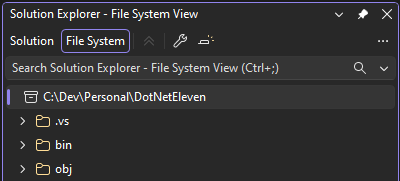
WinUI looked really cool, and it appears to be Microsoft's modern native UI framework, specifically for Windows 11 and beyond. It seems like a fancier, more modern version of Windows Forms or WPF, and has its own dev tools similar to a browser.
https://github.com/dotnet/skills is a repository of AI agent skills that are intended to assist agents with .NET and C# development. Seems really useful; I'm going to add this to Claude at work and see how it improves things.
Microsoft has awarded over $1M in CVE (Common Vulnerabilities and Exposures) bounties this year. Yikes. Due to LLMs being so commonplace, lots of issues are being found, and they’re being reported too.
EF Core 11 ships with .NET 11 and has join pruning (now prunes out
JOINs that aren't necessary based on what you're.Select()ing), Vector Search,FULL OUTER JOINsupport, new functionsJsonContainsandJsonPathExists, new SQL translations such asint.Parse()support, and much more.
Conclusion
This was a great conference to attend virtually, and I'm thankful that Microsoft has kept the event running even in the AI era (cough can't say the same for the React team, cough). I liked how the team at Microsoft presented some sessions in a very old-fashioned way: writing code manually in the moment, opening a terminal and typing in some commands, etc. While there definitely was a lot of Co-Pilot usage, they acknowledged that developers have different comfort levels with AI use, and I appreciated that.
If you missed this year's .NET Conf, you can watch it on the .NET Conf 2026 YouTube playlist.
About the author
- I am a full-stack developer specializing in React, Next.js, TypeScript, C#, .NET and Sitecore. I love working on back-end as well as front-end, writing documentation, finding solutions to problems, and writing technical blog posts to help others. I've been Sitecore certified and Coveo for Sitecore certified twice.
Comments
Join the discussionNo comments yet. Be the first to comment.